Experts spotted a phishing campaign that employees overlay screens and email ‘quarantine’ policies to steal Microsoft Outlook credentials from the victims.
Researchers from Cofense discovered a phishing campaign that uses overlay screens and email ‘quarantine’ policies to steal Microsoft Outlook credentials from the targets.
The overlay screens are displayed on top of legitimate webpages to trick victims into providing their credentials.
“Message quarantine phish are back, this time with a new tactic utilizing the targeted company’s homepage as part of the attack. The Cofense Phishing Defense Center (PDC) has identified this campaign which attempts to steal employee credentials by posing as a message quarantine email.” reads the analysis published by Cofense.
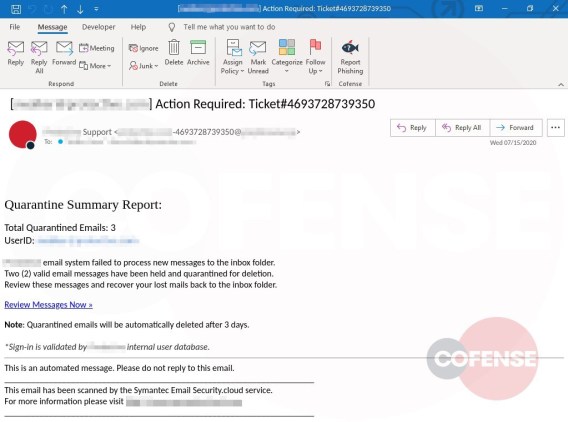
The experts observed the new technique in an attack aimed at an unnamed company, the messages were posing as the technical support team of the employee’s company. The emails claimed that the company’s email-security service had quarantined three valid email messages and asked the victims to review them by accessing their inbox. To put pressure on the victims and trick them into interacting with the targeted site the messages states that two of the messages were considered valid and are being held for deletion.
“This could potentially lead the employee to believe that the messages could be important to the company and entice the employee to review the held emails.” continues the report. “Another social engineering technique the threat actor uses to lure the employee into interacting with the email is giving the messages urgency, asking the recipient to review them or they will be deleted after three days.”
The email claims the failure in processing the messages moved to quarantine and asks the victims to review it in order to confirm their validity.

Thi social engineering technique is very effective and leverage employees’ fear for the impact of the loss of important documents and communications.
Experts pointed out that hovering over the “Review Messages Now” included in the email it shows a suspicious URL.
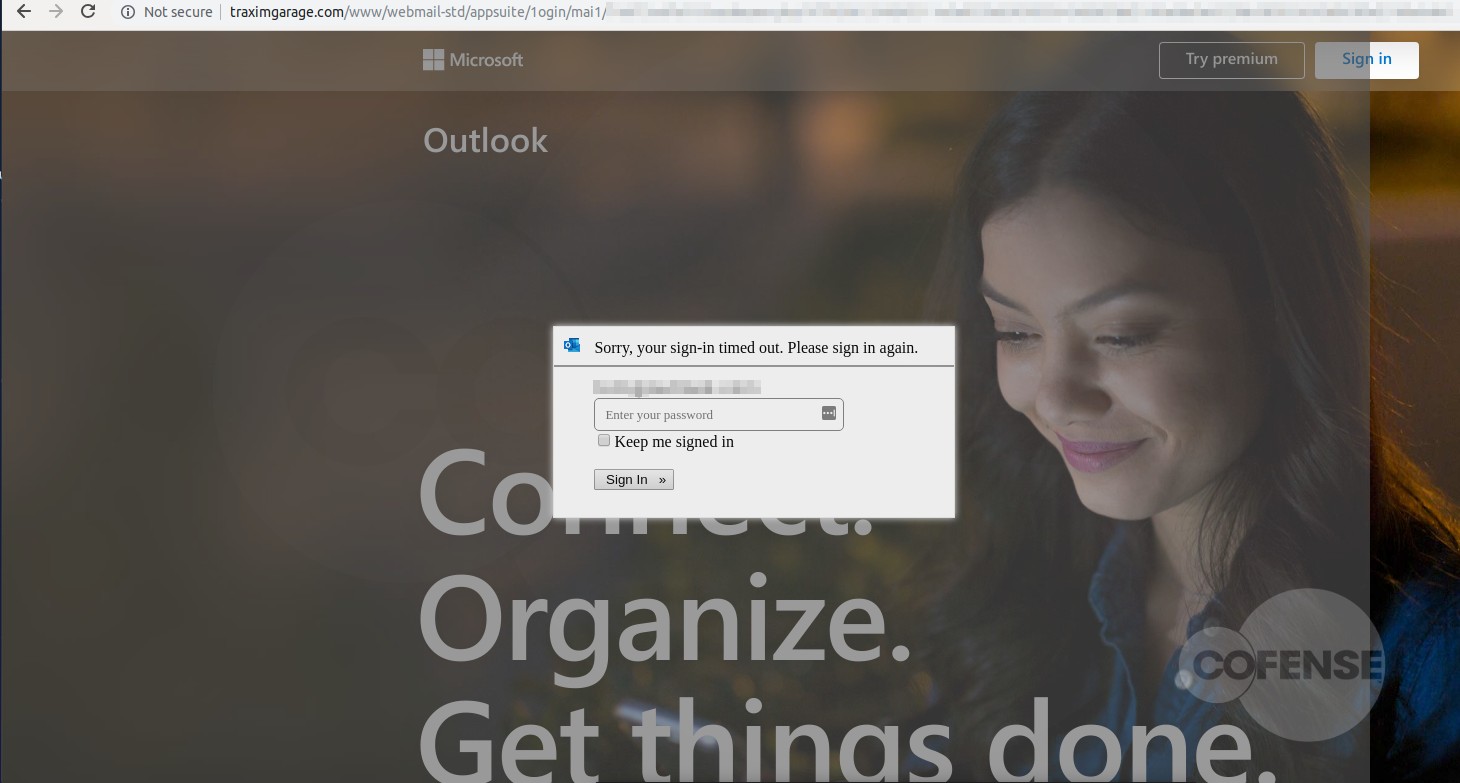
Upon clicking on the link, the employees are redirected to their legitimate company website and an Outlook email login screen is displayed.
Experts discovered that the Outlook email login screen is the result of an overlay screen added by the attackers to collect the victims’ credentials.
“However, further analysis has determined that the page shown is actually the company’s website home page with a fake login panel covering it. This gives the employee a greater comfort level, by displaying to a familiar page. It is also possible to interact with this page by moving outside of the overlay, showing that it is the actual page they have seen and used before.” states the analysis. “The overlay itself is attempting to prompt the user to sign in to access the company account.”
The credentials entered by the employees are then sent to the attackers.
Each malicious link employed in this campaign used specific parameters to determine the page pull to use, and then overlay the fake login on top.
“Depending on what company the threat actor is targeting, the link will populate the address of the original recipient of the email.” concludes the report. “After the equal sign, the link will look at the domain of that address and pull the homepage.
(SecurityAffairs – hacking, quarantine messages)