Introduction
As the digital landscape grows more complex, data security and auditing practices are critical for organizations managing sensitive information. In this guide, we’ll explore how to effectively audit TiDB to ensure your database activities remain secure, compliant, and transparent. While TiDB’s native auditing capabilities provide essential features, enhancing your auditing process with advanced solutions is key to meeting regulatory and security requirements.
According to cybersecurity statistics, cyberattacks are on the rise, making database audit processes more important than ever. A robust auditing framework can help organizations stay ahead of these threats.
TiDB offers basic audit functionality that allows you to track query execution, monitor user activities, and keep an eye on database performance. However, to fully harness the power of auditing, you’ll need to activate and configure these features first.

Step 1: Enabling Audit Features
To get started with TiDB auditing, you’ll need to configure a few settings to enable basic logging:
-- Enable slow query logging
SET @@global.tidb_enable_slow_log ;

-- Set memory
SET ;  -- 1GB memory limit
SET @@global.tidb_expensive_query_time_threshold ;  -- Time threshold for slow queries
Example output for successful configuration:
Query OK, 0 rows affected (0.01 sec)
Step 2: Testing Your Audit Setup
Next, generate some activities that will trigger your audit logs, allowing you to confirm that the logging system is working properly:
CREATE TABLE audit_test (
    id SERIAL PRIMARY KEY,
    name VARCHAR(100),
    access_time TIMESTAMP
);


INSERT INTO audit_test (name, access_time)
VALUES ('test_user', NOW());


SELECT * FROM audit_test WHERE id > 1000;
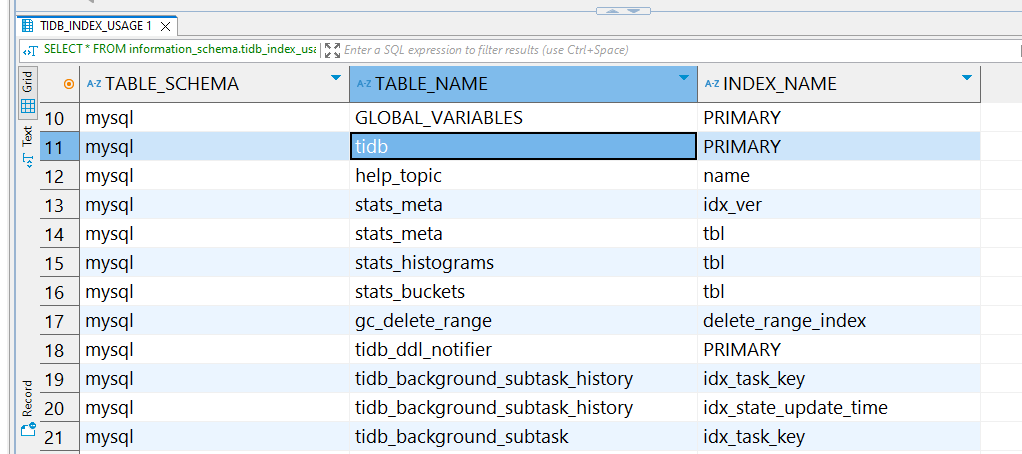
You can monitor the results by querying the slow_query table:
Step 3: Reviewing the Audit Logs
To review slow queries and other important audit data, run this query to identify any queries that took longer than expected:
SELECT * FROM information_schema.slow_query
WHERE query_time > 0.6;
This helps you locate inefficient queries that may need optimization.

TiDB’s native audit logs provide insights into query execution times, user logins, and other relevant database activities. To delve deeper into TiDB’s built-in audit features, check out the official TiDB audit guide.
How to Audit TiDB in the Most Efficient Way with DataSunrise
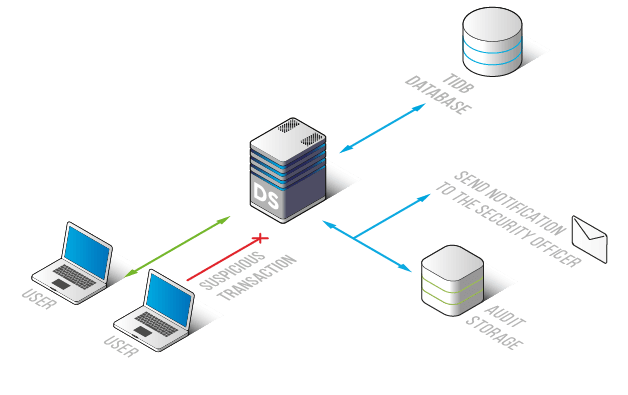
TiDB offers essential audit trail features, but by integrating DataSunrise, you can enhance the auditing process with intuitive controls, detailed rule creation, and clear visual audit logs. This guide will walk you through the process of setting up and using DataSunrise to audit TiDB effectively.
Step 1: Establish a Connection with TiDB

The first step in using DataSunrise for TiDB auditing is to connect your TiDB database to the platform. This process is quick and simple—just enter your TiDB server’s host, port, and authentication details. Once connected, DataSunrise will automatically begin monitoring your TiDB instance in real time.
Step 2: Set Up Custom Audit Rules

With DataSunrise successfully connected, you can create tailored audit rules. These rules allow you to monitor specific activities, such as failed login attempts, modifications to critical data, or even track queries executed by privileged users. By defining these rules, you ensure that every important action is captured for further analysis.
Step 3: Review TiDB Audit Trails

Once your rules are in place, you can head to the Transactional Trails section of DataSunrise to view the audit logs. Here, you can filter records based on criteria such as the user, query type, and timestamp to get a deeper insight into database activity. This allows for efficient tracking and analysis of TiDB’s operations.
Why Choose DataSunrise for TiDB?
- Seamless Integration: DataSunrise integrates easily with TiDB and offers multiple deployment options to suit your specific needs.
-
Customizable Audit Rules: With DataSunrise, you can create detailed audit rules tailored to specific TiDB objects, ensuring comprehensive tracking of database events.
-
Advanced Threat Protection: In addition to basic auditing, DataSunrise offers cutting-edge threat detection using AI-driven behavioral analytics to spot potential security risks.
How DataSunrise Benefits TiDB Auditing
By integrating DataSunrise, you unlock several key advantages:
- Risk Mitigation: Address potential compliance violations or security threats before they escalate.
- Time Efficiency: Automate tedious audit tasks, saving both time and effort.
- Compliance Assurance: Easily meet regulatory requirements through automated reporting and monitoring.
- Enhanced Data Security: Real-time threat detection and advanced auditing prevent unauthorized activities and breaches.
Conclusion
While TiDB’s native auditing tools are sufficient for basic tracking, DataSunrise offers an enhanced solution for organizations needing more advanced auditing, compliance management, and security. By implementing DataSunrise, you ensure your TiDB database is properly monitored, secure, and compliant.
Take your TiDB auditing to the next level by scheduling a live demonstration today and discover how DataSunrise can transform your data security and compliance framework.